Skip to content
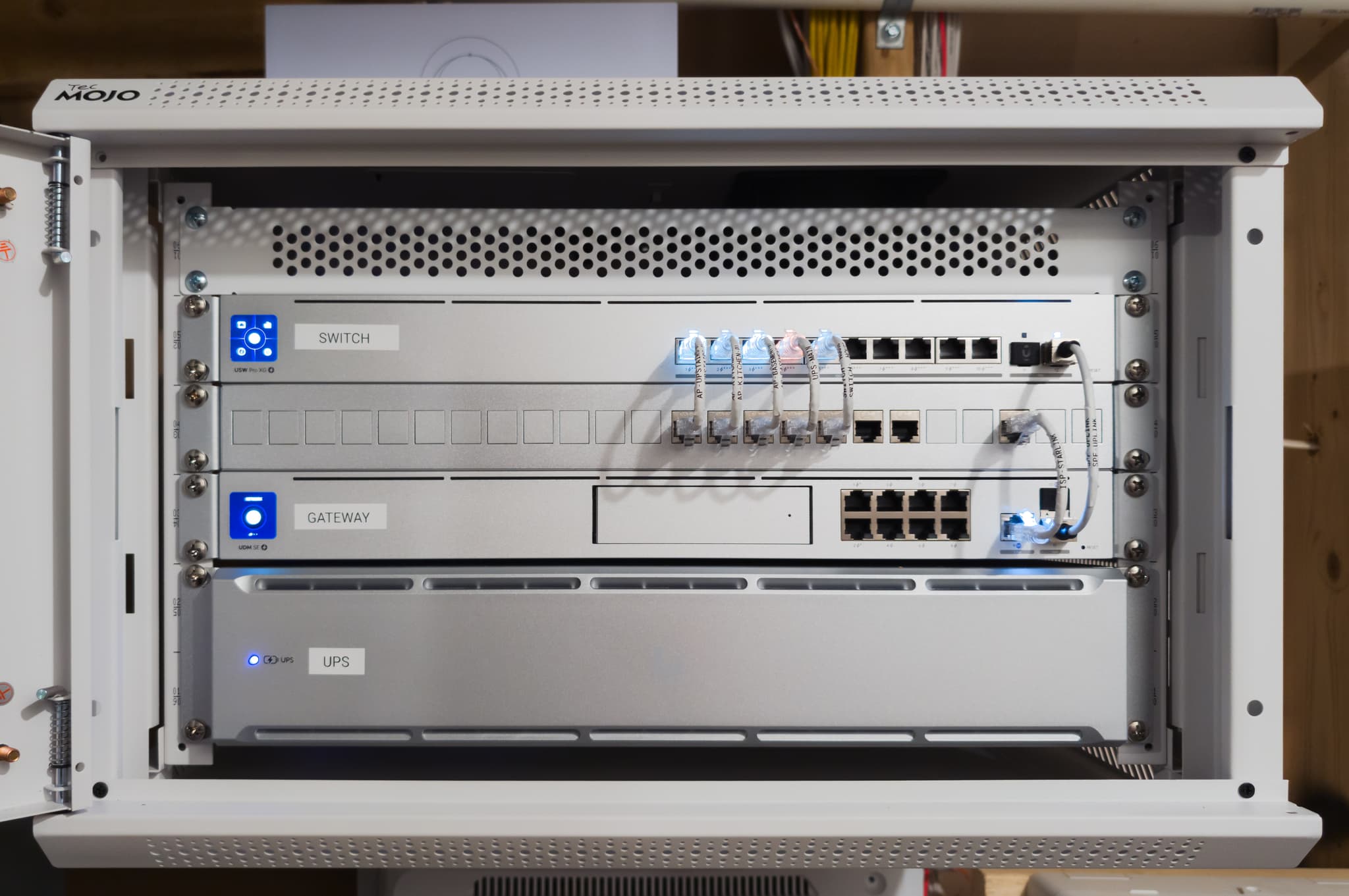
Network rack in a Leesburg executive home: the wired core that the home's access points connect back to
Technical Analysis12 min read

Why Mesh Wi-Fi Still Leaves Weak Spots:
Wired Ethernet, MoCA, and Wi-Fi 7 Backhaul Compared

Mesh networks often underperform because of how the units connect to each other, not because of the units. This compares wired Ethernet, MoCA, and Wi-Fi 7 multi-link operation as backhaul, and how to choose.

December 2025
Eric Enkh, Owner & Lead Engineer
< 1 ms
Wired link
Latency a switched Ethernet link adds
2.5 Gbps
MoCA 2.5
Rated data rate (MoCA Alliance)
5.8 Gbps
Wi-Fi 7, two streams
Peak link rate in the spec, not throughput
Wired first
Hierarchy
Ethernet, then MoCA, then wireless

Summary

The Verdict on Mesh Backhaul

How the mesh units reach the main router decides much of how the whole system performs. This article compares wired Ethernet, MoCA over coax, and Wi-Fi 7 multi-link operation (MLO) as that link, using the published specifications and what limits each one in a real house.

The verdict: wired Ethernet remains the reference for backhaul. Wi-Fi 7 MLO is the biggest advance in wireless backhaul in years, but it does not replace a cable where the connection has to be dependable.

The Problem

Why Backhaul Matters

Every mesh Wi-Fi system runs two networks side by side, and most people only think about one of them.

Fronthaul: your connection

The wireless link between a mesh unit and your devices: laptops, phones, TVs. This is the connection you feel when you use the Wi-Fi.

Backhaul: the spine

The connection from each extra mesh unit back to the main router, over a cable, over coax, or over the air. It is the hidden limit on what every device near that unit can get.

Why wireless hops cost throughput

A mesh unit with a wireless backhaul has to receive traffic from the router and send it on to your devices. When the same radio does both jobs on the same channel, as many older or budget systems do, it can only spend part of its airtime on each. That is where the familiar rule of thumb comes from: roughly half the throughput is lost at each hop.

Treat that as a rough rule for the single-radio case, not a law. Units with a dedicated backhaul radio, and Wi-Fi 7 units using MLO, avoid most of that halving. What they cannot avoid is distance, walls, and interference on the link between units, and a second wireless hop compounds all of it. The only way to know what a given house loses is to measure it there.

How to measure it at your property
  1. Put a wired computer running iperf3 as the server at the main router or switch.
  2. Stand in the same spot near each access point with the same laptop or phone, on the same band and channel width, and run the test for at least 30 seconds.
  3. Repeat at an access point that is wired, one that is one wireless hop away, and one that is two hops away if the system has one.
  4. Run the set twice: once when the house is quiet and once in the evening, when neighbors’ networks and your own devices are busiest.
  5. Record the equipment, firmware, band, channel width, distance between units, and the walls or floors in between. Without those, the numbers do not transfer to another house.

The Comparison

Backhaul Options Side by Side

Ratings are what each standard or product family publishes. Real throughput in a house is lower and depends on the equipment, the building, and the interference around it.

BackhaulPublished ratingWhat limits it in a houseLatency it addsWhen it fits
Wired Ethernet1 Gbps to 10 Gbps per link, set by the cable category and the equipment at each endNeeds a cable path; each run up to 100 mLowest: a switched link adds well under a millisecondAnywhere a cable can be run, now or through conduit
MoCA 2.5 (over existing coax)Up to 2.5 Gbps actual data rate, per the MoCA AllianceCondition of the coax, splitters, and every MoCA adapter sharing the lineLow: the MoCA Alliance cites about 3 ms typical and 5 ms averageCoax already reaches the rooms that need an access point
Wi-Fi 7 wireless backhaul (MLO)About 5.8 Gbps peak link rate for two spatial streams, per the Wi-Fi Alliance; the 40 Gbps-plus figures often quoted assume more streams than home equipment has. Link rates, not throughputDistance, walls, interference, and the radios in each unit; each hop shares airtimeLow when the link is clean; rises with interference, load, and hopsNo cable path and no coax, with the units placed within clear reach of each other
Older mesh relaying on one radioSet by the Wi-Fi generationThe same radio receives and retransmits, so each hop leaves roughly half the airtimeVariable; grows with every hopLight use in a small home

Sources (checked September 2026)

Key Findings

What the Comparison Shows

Wired Ethernet remains the reference

It carries the most, adds the least latency, and does not share airtime with the devices in the room. Where a cable can be run, it is the right backhaul.

MoCA 2.5 is often overlooked

If coax already reaches the right rooms and is in good condition, MoCA 2.5 gives a wired-like backhaul with a few milliseconds of latency and very little construction.

Wi-Fi 7 MLO narrows the gap

Multi-link operation lets a unit use more than one band at once, which makes a wireless backhaul steadier and faster than earlier generations. It is still a radio link, with a radio link’s limits.

Wireless-only has hard limits

Every wireless hop spends airtime, meets walls, and meets interference. A second hop compounds all three. MLO reduces the penalty; it does not remove it.

The Framework

Choosing the Right Technology

The right backhaul depends on the paths the house already has, or can be given.

1

You can run Ethernet (open walls, an attic or basement path, or conduit)

→ Use wired Ethernet

The most capacity and the least latency, with no airtime shared with the room. Worth the installation effort, and the path serves later upgrades too.

2

You cannot run cable, but coax reaches the rooms

→ Use MoCA 2.5

Check the coax and splitters first, and coordinate with any provider equipment already using MoCA on the line.

3

No cable path and no usable coax

→ Use Wi-Fi 7 wireless backhaul

Choose units with a dedicated backhaul radio or MLO, keep it to one hop where you can, and place each unit where it can reach the next one clearly. Not a substitute for wired, but materially better than older wireless backhaul.

Field Recommendation

Start with the paths the house already has. If Ethernet can be run, even through conduit left for later, that is the right choice. If coax already reaches the right rooms, MoCA 2.5 gives a wired-like link with little disruption. For a property with neither, Wi-Fi 7 with a dedicated backhaul radio or MLO is the best wireless option available.

The order is Ethernet, then MoCA 2.5, then Wi-Fi 7 wireless backhaul, then older wireless-only mesh. Each step down trades away some throughput, latency, or consistency.

Need help choosing the right backhaul for your home? Our whole-home Wi-Fi service plans access points and backhaul for properties across Northern Virginia and Montgomery County, Maryland, and our estate network service covers links between separate buildings.

The Bottom Line
Wireless backhaul is always a compromise. Wi-Fi 7 MLO makes it a much better one, but it is still a radio link sharing the air with everything else in the house. Where the connection has to be dependable, run the cable. Mesh works well when its backhaul is planned, and poorly when it is left to chance.
Eric Enkh
Owner & Lead Engineer, The Orbit Tech

Your Backhaul Determines Your Network

We plan access points and backhaul around the cable, coax, and walls your property actually has, before any equipment is bought. The first conversation is free, and Eric Enkh replies personally.